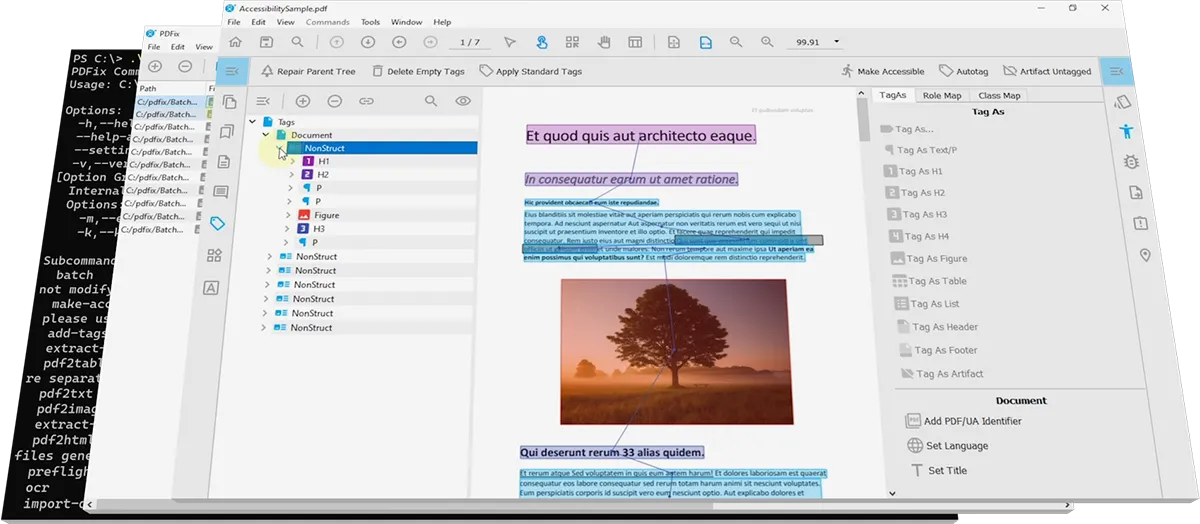
How to Choose the Right PDFix Solution for Accessible PDFs
Gemini PDFix Chatbot
Jefferson County, Texas
Font Fix (PDFix)
PDFix Marketplace Launches Automated Font Fix Actions for PDF/UA Accessibility
News
Ohio State University
European Telecommunications
California Judicial Department
Bulk Remediation Services
PDFix Desktop – US Pricing Plans
European Accessibility Act
How to Automatically Set Table Cell Scope in Tagged PDFs
How to Fix PDF Fonts Automatically for Accessibility and PDF/UA Compliance
Section 508
ADA Title II Universities
ADA Title II Government
PDF Compliance
Best PDF Accessibility Checker 2025: Validate PDF/UA with veraPDF – Complete Guide
ADA Accessibility Deadline 2026: How Governments Can Automate PDF Compliance with PDFix
Best AI Models for Auto-Tagging PDFs in 2025: Fast, Accurate, and PDF/UA-Ready
How to Generate PDF Alt Text Automatically: 4 Methods from Manual to AI-Powered (2025 Guide)
Font Fix (callas software)
Auto-Tag PDFs with AI-Powered IBM’s Docling: Make Documents Accessible in Minutes
How Deutsche Bank Automated PDF Accessibility Compliance with PDFix SDK
PDFix SDK Enterprise Pricing
Auto-Tag PDF (Docling IBM)
⏰ Best PDF Accessibility Checker 2025: Validate PDF/UA with open-source veraPDF
PDFix Desktop 2.5 Released – Smoother Tagging and Smarter Navigation
How USCIS Automated Section 508 PDF Accessibility Compliance with PDFix Desktop
New AI-Driven PDFix SDK Release – Faster PDF Accessibility Automation
⏰ Generate Figure and Formula Alt Text, MathML, Table Summaries, and Annotation Descriptions Automatically with PDFix Desktop
Auto-Tagging PDFs with PDFix Desktop
FAQ
PDF/UA-1 Accessibility Validator Comparison
PDF accessibility validators
Generate Alternate Text (Salesforce BLIP)
Automate Smarter PDF Auto-Tagging with PDFix SDK
Making Millions of PDFs Accessible at Scale – The PDFix Pipeline Approach
Learn AI-Powered PDF Auto-Tagging with PDFix Desktop
PDFix Services Pricing
PDFix SDK Pricing
PDFix Desktop Pricings
Unlocking PDF Accessibility at Scale for Enterprises | PDFix at PDF Days Europe 2025
Auto-Tagging PDFs with PDFix SDK
How to Add an Alternate Description to PDF Figure Tags
PDFix Desktop Sale
PDFix at PDF Days Europe 2025: Unlocking PDF Accessibility for Enterprises
AutoTag PDF (Amazon Textract)
How to Make Weekly Reports Accessible: Solving a Common Business Challenge
How to Define Headings for Auto-Tagging with PDFix
How to Automatically Tag Complex PDF Tables with PDFix
Automated PDF Accessibility Tagging with Amazon Textract and PDFix
VeraPDF Validation
Arlington PDF Model
Duplicate MCID Report
Language Detection
OCR Tesseract
HTML to PDF Conversion (Google Chrome)
Generate Formula MathML (OpenAI)
Generate Formula MathML (Paddle)
⚠️ Generate Alternate Text Vision
Generate Alternate Text (OpenAI)
Generate Table Summary (OpenAI)
AutoTag PDF (Paddle)
How to Make a PDF/UA-Compliant PDF in Minutes with PDFix Desktop
Set Annotation Contents: Add Alternate Description to PDF Annotations
Slovak Technical University of Košice
Auto-Tag Thousands of Bank Statements and Invoices with Single PDFix Layout Template
Set Content Color: Automatically Fix Low-Contrast Text in PDF
ADA Title II Accessibility Deadlines for State & Local Governments – Is Your PDF Content Compliant?
How Slovak Technical University Tackled PDF Accessibility with PDFix
AI-Powered Batch Invoice Processing: Automate PDF/UA Compliance with PDFix
Smarter PDF Auto-Tagging for Accessibility with Paddle AI and PDFix
New in PDFix: AI-Powered PDF Tagging, High-Volume Remediation & Template Logic
Layout Template
PDFix Launches Powerful New Template-Driven PDF Auto-Tagging
U.S. Citizenship and Immigration Services
Board of Governors of the Federal Reserve System
PDFix Case Studies
Deutsche Bank
Template Language Guide
PDFix SDK Flat Licesing
Automate PDF Accessibility Workflow in Minutes with PDFix Pipeline
Revolutionizing Accessibility: New Technical Rules for Accessible PDFs
Easily Integrate PDF Accessibility into Your Workflow with PDFix SDK
How to Automate Alt Text Generation in PDFs Using PDFix and OpenAI
Auto-tag PDFs Effortlessly with PDFix Templates – Part 1
PDFix SDK Volume Licensing
License Management
Accessibility Actions
Getting Started
Unsubscribe
Mastering PDF Validation: Tools, Profiles, and Automation
Make PDFs Accessible Faster: The Power of Automatic Language Detection
PDFix Pipeline
How to Tag Complex PDF Tables for Accessibility
Webinars
How to Automate InDesign PDF Accessibility Fixes
How to Manually Add Associated Headers
Basic Actions
Tag Tool
How to Define Content
How to Define Tags
Buy Now
PDFix Desktop 2.3 Release: What’s New!
PDFix Actions Marketplace
Buy Now – SDK
External Actions
PDFix Actions Pipeline
Missing help
How to Define Annotations
Help
The Challenges of Creating Accessible PDFs from Adobe InDesign
Enhance PDF Accessibility with Auto-Tagging Templates
Simplify PDF Accessibility with Auto-Tag API
Submit a ticket
Explore Free Online PDF Accessibility Tools
Download
PDFix Batch Actions
Tackle PDF Accessibility Challenges with Custom Actions
PDFix SDK 8.0 Release: What’s New!
PDFix Desktop 2.0 Release: What’s New!
Offline License Management
Convert PDF to Responsive HTML: The Ultimate Solution For PDF Accessibility
Thank you
License
Destinations
Browser
PDF Conversion
Fonts
Thumbnails
User Guide
Preferences
SDK Actions
Selection tools
Table Tool
Workspace
Layout Template
Explore PDF Remediation Tools: Join Our Online Session!
Content
Tags
Accessibility
Bookmarks
Annotations
How to Create Accessible PDF
Run PDF Validation
PDFix Desktop Changelog
Digital Accessibility in USA: News and Deadlines 2024!
PDFix Desktop 1.5: What’s New in Latest Release!
PDFix SDK 7.3.0: What’s New in Latest Release!
VeraPDF: Industry-Supported PDF/UA Validation
Your Guide To PDF Accessibility In Education
PDFix SDK & Desktop Release
PDFix Desktop Feature List
PDF Accessibility Checker For Web Accessibility
An Organization-Wide PDF Accessibility Solution
PDFix Web App
PDFix Desktop Pro License Activation
European Accessibility Act 2025: Are your PDFs ready?
Automatically Generate Alternate Text for Images
Auto-Tag a PDF with DeepDoctection
How Can AI Assist PDF Accessibility?
Search
Tutorial: How to Make PDF Tables Accessible
New ISO Standards
Blog & News
Contact Us
Ochrana osobných údajov spoločnosti PDFix, s.r.o.
Personal Data Protection at PDFix, s.r.o.
Licenčné podmienky Spoločnosti PDFix, s.r.o.
PDFix Licensing Terms
About Us
Support
Pricing
Products
Solutions
PDFix SDK Changelog
Command Line Interface
Getting Started
PDFix Desktop Pro
PDFix Desktop Lite
PDFix SDK
Standard PDF Features
PDF to HTML
PDF Data Extraction
PDF Validation
Auto-Tag PDF
Make PDF Accessible
How to Batch Process Multiple PDF Files for Accessibility
How to Extract Data from PDF
Tutorial: Fixing Table Tags in PDF
How to Fix Incorrectly Tagged PDF
How to Manually Tag a PDF for Accessibility
Fixing PDF Validation Errors: Metadata
Fixing Validation Errors: Image
Fixing PDF Validation Errors: Link Failures
How to Automatically Tag a PDF: A Quick Guide.
Your Guide to PDF Validation
A Complete Guide: How to Convert PDF to HTML
PDFix Desktop Beta
Extract Data from PDF
The PDFix Command-Line Utility
Custom PDF Solutions with the PDFix SDK
PDFix SDK for Python has just been released!
Scrape PDF Data Easily with PDFix SDK
Attending ODSC Europe 2018 in London
PDF Form Filling directly in a Web Browser?
How to Make PDF Document Responsive?
GDPR and Personal Data in PDF
PDF Days Europe 2018
Memories of PDF Days Europe 2017
Tagged PDF
We are not alone
The Magic of Data hidden in a PDF
PDF Responsive Revolution
For Windows, Linux and macOS

Desktop Lite
Free PDF viewer and accessibility checker with built-in veraPDF validation, supporting multiple compliance profiles and direct navigation to detected issues.

Desktop Pro
All-in-one automated PDF accessibility solution for PDF/UA and WCAG compliance, aligned with ADA, Section 508, and European accessibility regulations.

SDK
Enterprise PDF accessibility SDK for integrating automated tagging, remediation, and validation into scalable document workflows across US and EU requirements.
Disclaimer: PDFix provides tools and technology to assist in making your documents accessible, but we do not guarantee 100% document accessibility. Achieving full compliance requires human checks and intervention. Please note that PDFix is a technology provider, not a service provider. The responsibility for document compliance rests with the user.