DeepDoctection is a toolbox designed to make it easier to start working on this topic.
DeepDoctection is a Python package that allows the creation of document extraction analysis and document layout analysis tasks by using deep learning models. It focuses on applications related to document extraction from PDFs or scans in various image formats. Deepdoctection provides model wrappers for various tasks to be integrated into pipelines.
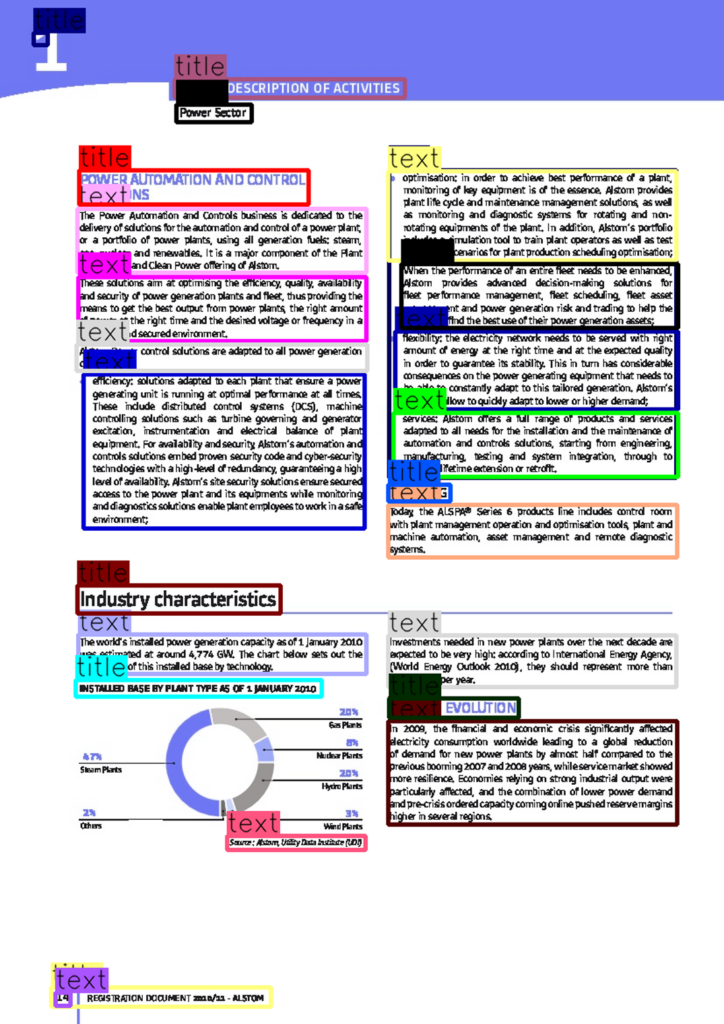
PDFix – Autotag – DeepDoctection
Our example of auto-tagging PDF documents with PDFix SDK and the deepdoctection python AI library for document extraction and layout analysis is now available on GitHub.
LINK: https://github.com/pdfix/pdfix-autotag-deepdoctection
Use Layout Recognition Results to Create Accessible PDF
Test an example of auto-tagging PDF document with PDFix SDK and the deepdoctection Python AI library for document extraction and layout analysis available at Huggingface.
LINK: https://huggingface.co/spaces/deepdoctection/deepdoctection
Deepdoctection is supported on macOS/Linux.
How-to:
Installation
Create a virtual Python environment
python3 -m venv env && source env/bin/activateInstall the PDFix SDK package
pip install pdfix-sdkTo install deepdoctection library follow the steps on https://github.com/deepdoctection/deepdoctection#installation
Run the example
To run the example execute
python3 autotag.pyThank you for visiting our Blog. If you have any questions or comments, please do not hesitate to contact us.