

Free PDFix Accessible PDF Reader for Low Vision
Large, high-contrast text that reflows to your screen
The PDFix Accessible PDF Reader is a free PDF reader for people with low vision. It shows a PDF as text that reflows to the window. You can make the text larger, switch to a high-contrast reading profile, jump through the table of contents and search the document. Free in PDFix Desktop Lite.
// PDFix Desktop 4 · PDFix SDK 10
CHROME EXTENSION
Read PDFs right in Chrome
The PDFix Accessible PDF Reader for Chrome is coming soon.
WHY IT MATTERS
Why PDFs are hard to read with low vision
A PDF page has a fixed layout. When you zoom in, the lines run off the screen and you scroll left and right to read each line. In Accessibility Requirements for People with Low Vision, the W3C notes that some people with low vision have to scroll several screens to read a single line of text. WCAG success criterion 1.4.10 Reflow exists to support people with low vision who need to enlarge text and read it in a single column.
The same W3C document notes that many people need high contrast between text and background, and that readable color combinations differ a lot from person to person. According to the World Health Organization, at least 2.2 billion people worldwide have a near or distance vision impairment. The PDFix Accessible PDF Reader is made for people with low vision, people with visual impairments and people with dyslexia.
FEATURES
Accessibility features for low vision
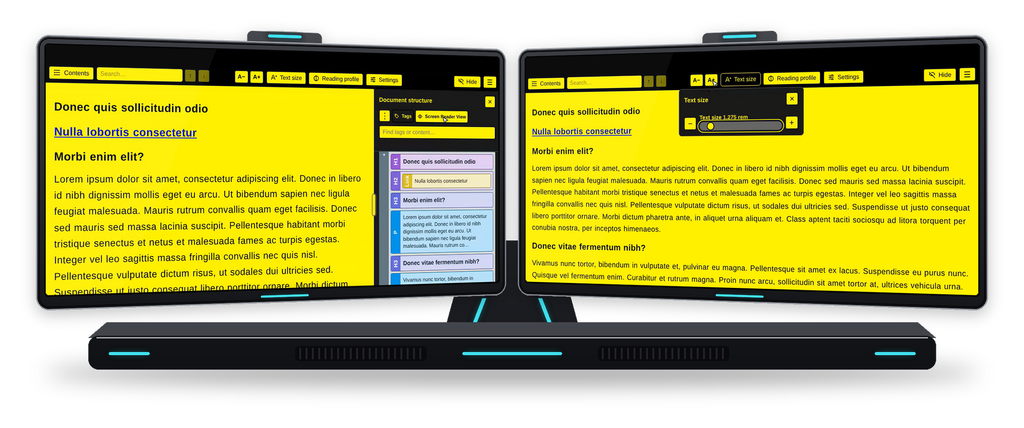
- Reflowed text. The reader shows the PDF as HTML that fits the width of the window, so you read top to bottom without scrolling sideways.
- Text size. Make the text larger or smaller with the A− and A+ buttons or the text size slider.
- Reading profile. Switch to a high-contrast reading profile, for example black text on a yellow background.
- Table of contents. Open Contents to jump to a section of the document.
- Find. Press Ctrl+F to search the text. The Find panel stays open while you read.
HOW IT WORKS
How to use the free accessible PDF reader
Free in PDFix Desktop Lite
- Download the free PDFix Desktop Lite.
- Open the PDF.
- In Document View, choose Reading View.
- Set the text size and the reading profile you need.
Free online on pdfix.io (coming soon)
Upload a PDF on pdfix.io and get accessible HTML.
Best with tagged PDFs
The reader is built from the tags in the PDF. PDFix converts the tags to HTML with PDF to HTML derivation, so the reader follows the structure of the document. When a PDF has no tags, the reader falls back to responsive HTML.
Do you publish PDFs? Tag them, so your readers get the best reading view. Auto-tag PDFs with PDFix →
FOR DEVELOPERS
Accessible reading view in PDFix SDK
PDFix SDK 10 adds Reading view to PDF to HTML conversion, with the new kHtmlReader flag, so developers can create the reading view from code.
Explore PDFix SDK → · PDF conversion in PDFix →
Frequently Asked Questions
What is the PDFix Accessible PDF Reader?
It is the Reading view in PDFix Desktop 4.0. It shows a PDF as reflowed text with adjustable text size, reading profiles, a table of contents and Find, so people with low vision, visual impairments or dyslexia can read it more easily.
Is the Accessible PDF Reader free?
Yes. The reader is included in the free PDFix Desktop Lite, a free PDF reader with accessibility features for low vision: reflowed text, adjustable text size and a high-contrast reading profile. A free online version on pdfix.io is coming soon.
Can people with dyslexia use the reader?
Yes. The reader shows the text in one column that fits the window, lets you make the text larger and lets you switch to a high-contrast reading profile.
Does the PDF need to be tagged?
A tagged PDF gives the best result, because the reader is built from the tags. If the PDF has no tags, the reader falls back to responsive HTML.
How do I open a PDF in the reader?
Download the free PDFix Desktop Lite, open the PDF and choose Reading View in Document View. There is also a Reading view setting in Preferences.
Can I search the text in the reader?
Yes. Press Ctrl+F, the same shortcut as in the PDF view. The Find panel stays open while you read.
Is the reader available in PDFix SDK?
Yes. PDFix SDK 10 adds Reading view to PDF to HTML conversion, with the kHtmlReader flag.
Updated November 2026, for PDFix Desktop 4.0 and PDFix SDK 10.0. Sources: PDFix Desktop 4 and SDK 10 release, W3C, Understanding SC 1.4.10 Reflow, W3C, Accessibility Requirements for People with Low Vision, WHO, Blindness and vision impairment.
Disclaimer: PDFix provides tools and technology to assist in making your documents accessible, but we do not guarantee 100% document accessibility. Achieving full compliance requires human checks and intervention. Please note that PDFix is a technology provider, not a service provider. The responsibility for document compliance rests with the user.