

FREE LIVE WEBINAR · DECEMBER 3, 2026
Screen Reader View, Validation Score & PDF/UA-2: What’s New in PDFix Desktop 4
PDFix Desktop 4.0 is a major update, full of handy new features. Paul Rayius shows the best of them live: a new validation score that tells you where to start, a Screen Reader View that previews how screen readers read your PDF, support for PDF/UA-2 remediation, and a new Accessible PDF Reader for low vision.

For accessibility teams · remediation providers · document operations · publishers · government and higher ed · business enterprises
Can’t make it live? Register anyway – we’ll send you the recording.
WHY ATTEND
PDF/UA-2 Is Arriving. Pass / Fail Is Not Enough.
PDF/UA-2 (ISO 14289-2) files are starting to show up. Validating them is one thing – fixing them is another.
The new features solve both. Paul walks through real documents and shows how each one saves time in a real remediation workflow.
WHAT’S NEW IN PDFIX DESKTOP 4.0
5 New Features You’ll See Live
1. A validation score that shows how much work is left
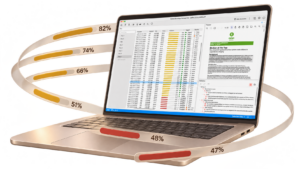
PDF/UA Pass / Fail stays exactly as strict as before. Next to it, a new score estimates how much accessibility work each file still needs, with a quality bar for every file in the list and on the document – so you know where to start in a big batch. Set your own rule weights, then export the score so your whole team works to the same standard.
2. Screen Reader View: see how a screen reader reads your PDF
While you remediate, Screen Reader View shows a preview of how screen readers will read your PDF – in the reading order assistive technology follows, with headings, lists, tables and figures exactly as they are tagged. Spot a wrong reading order or a mistagged element right away, before you test the file with a real screen reader.
3. Support for PDF/UA-2 – fix it, not just validate it
PDFix now validates against the PDF/UA part each file declares and keeps that profile in view while you work. Ten new fix actions cover the checks that came with PDF/UA-2 – associated files, MathML associated files on formulas, footnotes (FENote), table of contents references, structure destinations on links, caption position and more. You can also edit PDF 2.0 namespaces directly.
4. Accessible PDF Reader for low vision
PDFix Desktop 4 includes a new accessible PDF reader for people with low vision and other visual impairments. Accessible Reader reflows a PDF into clean, easy-to-read text with a high-contrast display, so visually impaired can follow the document without zooming and scrolling across a fixed page layout. It works on untagged PDFs too.
5. Large files save about 2.5× faster
A full save of a big tagged PDF is about two and a half times faster. Incremental save writes only your changes, long saves show progress and can be cancelled, and work on large tag trees is faster too.
ALSO NEW IN 4.0
Faster Everyday Tagging and Remediation
SPEAKER
Who Will Lead the Session

Paul Rayius
VP of Customer Support & Training


Paul is a PDF accessibility expert, a PDF Association working group chair and a member of the ISO PDF/UA working group. He leads customer support and training at PDFix, so the demo follows the questions real remediation teams ask.
Webinar FAQ
When is the What’s New in PDFix Desktop 4 webinar?
Thursday, December 3, 2026 at 6:00 PM CET (12:00 PM EST, 9:00 AM PST). It is online and free. The session runs about 45 minutes, followed by a live Q&A.
Will there be a recording?
Yes. Register even if you can’t join live – everyone who registers gets the recording by email after the session.
What is new in PDFix Desktop 4.0?
PDFix Desktop 4.0 adds PDF 2.0 and PDF/UA-2 remediation, a configurable validation score that ranks the accessibility work still left, a Screen Reader View that previews how screen readers read your PDF, an Accessible PDF Reader for low vision, HTML, Markdown and EPUB output, validation guidance overlays, and about 2.5× faster saving of large tagged files. New tagging actions include Tag Text, Wrap Tags, Fix Tag Tree and Tag as TOC.
Can PDFix remediate PDF/UA-2 documents?
Yes. From version 4.0, PDFix Desktop validates each file against the PDF/UA part it declares (PDF/UA-1 or PDF/UA-2, ISO 14289-2) and includes new fix actions for PDF/UA-2 checks such as associated files, MathML on formulas, FENote, TOCI references, structure destinations and DisplayDocTitle.
What is the PDFix validation score?
It is an estimate of how much accessibility work a file still needs, based on the remaining issues and their volume. It does not replace PDF/UA Pass / Fail, which stays binary. You can create named scores, change per-rule weights, and import or export them under Settings → Validation → Validation score.
Can PDFix convert a PDF to HTML, Markdown or EPUB?
Yes. PDFix Desktop 4.0 and PDFix SDK 10.0 derive HTML, Markdown and EPUB from the PDF tag structure, following the direction of the PDF Association’s Deriving HTML from PDF specification. EPUB conversion requires a tagged PDF; untagged files can fall back to responsive HTML.
Is there an accessible PDF reader for low vision in PDFix Desktop?
Yes. PDFix Desktop 4 includes Accessible Reader, which displays PDFs as reflowed, high-contrast text for people with low vision and other visual impairments. Headings and a table of contents make long documents easy to navigate. It works on untagged PDFs too – PDFix tags them automatically first.
Who should attend?
Anyone who makes PDFs accessible at volume: accessibility and compliance teams, remediation service providers, document operations, publishers, and government or higher-education teams working toward ADA Title II, Section 508 or European Accessibility Act requirements. Existing PDFix users will see what changes in their daily workflow.
Thursday, December 3 · 6:00 PM CET / 12:00 PM EST · Free
Get Ready for PDF/UA-2
A validation score, Screen Reader View, PDF/UA-2 support, an Accessible PDF Reader for low vision and faster saves – shown live on real documents.