


Diana Kosovacova
Digital Marketing Lead & PDF Accessibility Evangelist


PDFix Desktop 4.0 and PDFix SDK 10.0, released on November 18, 2026, make work on large tagged PDFs faster. You can now see which PDFs need the most work, review the tag structure in a Screen Reader View, fix PDF/UA-2 errors, open PDFs in an accessible reader for people with low vision, and turn PDFs into HTML, Markdown or EPUB.
IN THIS POST
| Issue | What is new |
|---|---|
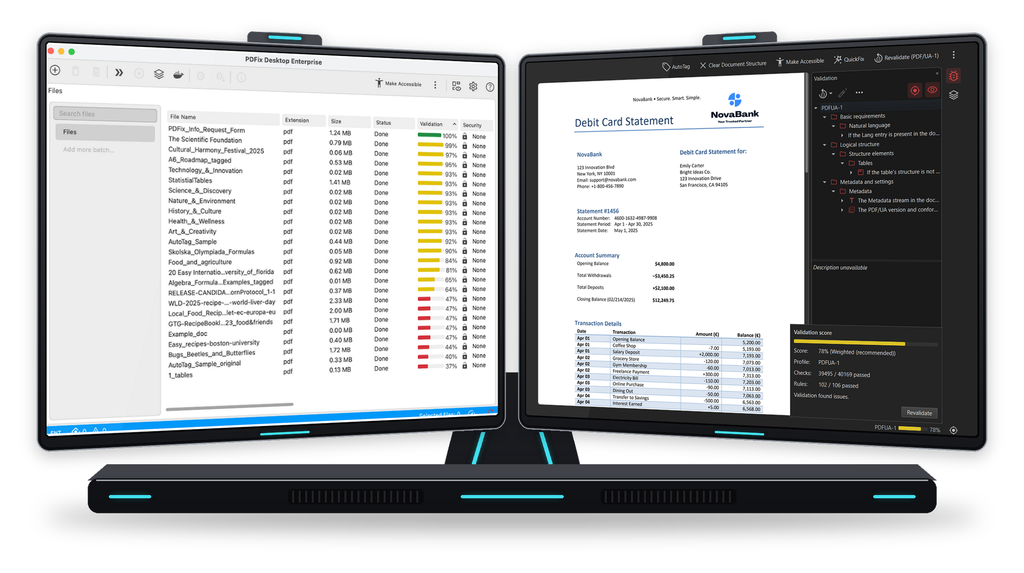
| I have hundreds of PDFs and don’t know where to start | A validation score ranks files by the work left |
| I can’t tell how a screen reader will read my PDF | Screen Reader View presents the tag structure |
| My PDF/UA-2 files fail validation | Ten automated fixes for PDF/UA-2 errors |
| Readers with low vision struggle with our PDFs | An accessible PDF reader with high-contrast, reflowed text |
| We need the content outside the PDF | PDF to HTML, Markdown and EPUB |
| Large tagged PDFs are slow to work with | Saving is about 2.5× faster |
PDFix Desktop 4.0
// NEW: VALIDATION SCORE
Which PDFs should I fix first?
A PDF accessibility checker tells you Pass or Fail. In a large batch, that is a long list of “Fail” and no idea where to begin.
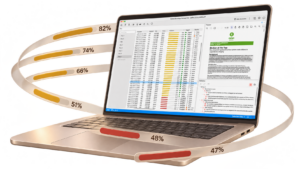
PDFix Desktop 4.0 keeps PDF/UA Pass / Fail as strict as before and adds a score next to it. The score estimates how much accessibility work each file still needs. Every file in the batch gets a quality bar, so the quick wins and the hard cases are visible at once.
You can set your own rule weights and share them, so the whole team measures the same way. How the PDF Validation Score works →
// NEW: SCREEN READER VIEW
How will a screen reader read my PDF?
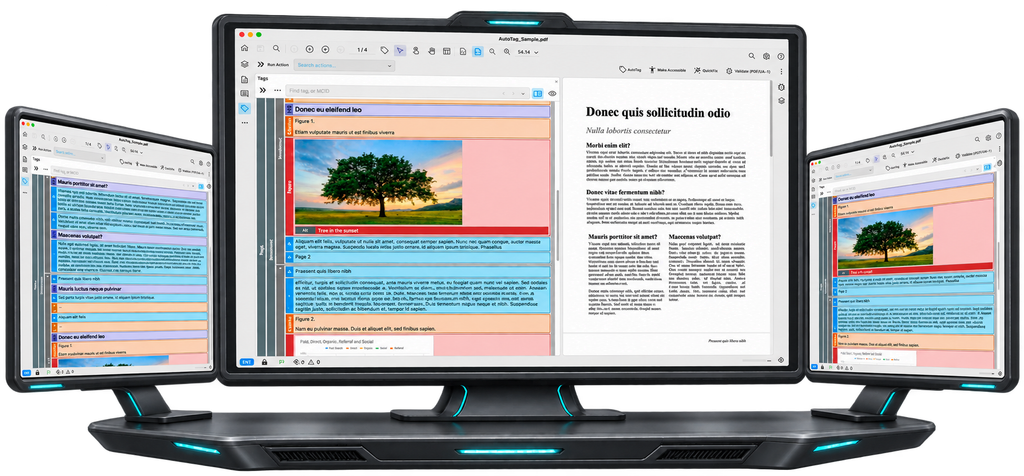
Screen readers read a PDF through its tags. Screen Reader View presents the tag structure in the Tags pane as nested boxes, with table spans, image previews and role maps.
You can drag, drop and rename tags in the same view. How Screen Reader View works →
// NEW: PDF/UA-2 REMEDIATION
How do I fix PDF/UA-2 errors?
PDF/UA-2 (ISO 14289-2) is the accessibility standard for PDF 2.0 files. It does not replace PDF/UA-1. It is based on PDF 2.0 and covers features such as MathML and associated files. Validating these files is one thing. Fixing them is another.
PDFix now checks each file against the PDF/UA version it declares and adds ten automated fixes for PDF/UA-2 errors. They cover formulas (MathML), link destinations, footnotes, captions, table of contents entries and attached files. PDF/UA-1 vs. PDF/UA-2: what is the difference →
// NEW: ACCESSIBLE PDF READER
How can people with low vision read a PDF more easily?
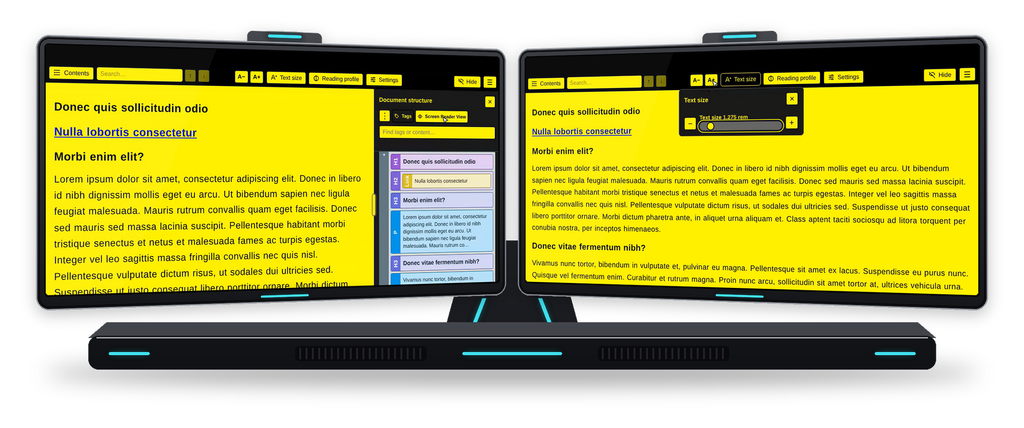
Zooming into a PDF means scrolling sideways on every line, because the page does not reflow. The new Accessible PDF Reader for low vision shows the PDF as clean, high-contrast text that wraps to the screen. Headings and a table of contents make long documents easy to navigate. For untagged PDFs, it falls back to responsive HTML. The reader is free in PDFix Desktop Lite. Free Accessible PDF Reader for Low Vision →
// NEW: PDF TO HTML, MARKDOWN, EPUB · WORD TO PDF
How do I convert a PDF to HTML, Markdown or EPUB without losing structure?
Tag-derived HTML and EPUB are built from the tags in the PDF. HTML, Markdown and EPUB output is stronger for lists, tables of contents, forms and figures.
- PDF to HTML moves toward the PDF Association’s Deriving HTML from PDF 1.2, published in September 2026.
- PDF to Markdown is new. Markdown is a common input format for LLM and RAG pipelines.
- PDF to EPUB turns a tagged PDF into an e-book format. E-books sold in the EU have had to be accessible since June 28, 2025.
See how PDF conversion works →
Word to PDF. Going the other way, a new Word to PDF action in the PDFix Actions Marketplace converts Word documents to PDF right in PDFix Desktop. Browse the PDFix Actions Marketplace →
// NEW: FASTER REMEDIATION
How do I remediate large or complex PDFs faster?
- Faster saving. A full save of a big tagged PDF is about 2.5× faster, and long saves can be cancelled.
- Tables of contents. PDFix recognizes and tags a table of contents, including the title and page-number columns.
- Repeated text. Find a pattern once and tag every match in the document.
- Broken tag trees. One action repairs the links between tags and page content.
- Splitting. Split a PDF by pages, tags or content, and every part keeps its PDF/UA status.
- Right-to-left languages. Auto-tagging now supports documents in languages such as Arabic and Hebrew.
See how automated PDF tagging works →
Full PDFix Desktop changelog →
PDFix SDK 10.0
// NEW: FOR DEVELOPERS
Can I automate all of this?
Yes. PDFix SDK 10.0 is the PDF accessibility SDK that runs inside PDFix Desktop. Developers can build the same steps into their own document pipeline:
- Convert PDFs to Markdown, EPUB and HTML in code.
- Run the ten PDF/UA-2 fixes and the new tagging actions.
- Read and write PDF 2.0 structure, including namespaces and link destinations.
- Trace a validation error back to the exact object in the file.
The PDF core is updated to a newer PDFium, and saving is more reliable. If your pipeline calls actions by name, note that Clone Form XObjects is now Update Form XObjects, Set Suspect Value is now Set MarkInfo and Suspects, and Fix Invalid Elements was removed.
See it live on December 3
Paul Rayius shows the new features in a free webinar on Thursday, December 3, 2026, at 6:00 PM CET (12:00 PM EST).
Everyone who registers gets the recording.
Register for the PDFix Desktop 4 webinar →
FAQ
Is PDFix a PDF accessibility checker or a PDF remediation tool?
Both. PDFix validates PDFs against PDF/UA with veraPDF and fixes the errors it finds, one file at a time or in batches.
What is Screen Reader View in PDFix Desktop 4.0?
A screen-reader presentation of the tag structure in the Tags pane, with nested boxes, table spans, image previews and role maps. Testing with a real screen reader is still recommended.
Does PDFix support PDF/UA-2?
Yes. PDFix validates each file against the PDF/UA version it declares and includes ten automated fixes for PDF/UA-2 errors.
What is the difference between PDF/UA-1 and PDF/UA-2?
PDF/UA-1 (ISO 14289-1) applies to PDF 1.7 files. PDF/UA-2 (ISO 14289-2) applies to PDF 2.0 files and adds rules for math, namespaces and associated files.
Can PDFix convert a PDF to Markdown or EPUB?
Yes. PDF to Markdown and PDF to EPUB are new in PDFix Desktop 4.0 and PDFix SDK 10.0. EPUB requires a tagged PDF.
Is there a PDF accessibility SDK for developers?
Yes. PDFix SDK 10.0 gives developers the same validation, tagging, fixing and conversion that PDFix Desktop uses.
Make your entire library PDF/UA compliant
Download PDFix Desktop 4.0 for the new validation score, Screen Reader View and PDF/UA-2 fixes, or build them into your own pipeline with PDFix SDK 10.0.