Solutions
Make PDF Accessible
Add Tags to PDF
PDF Validation
PDF Data Extraction
PDF to HTML
Standard PDF Features
Layout Template
Products
PDFix Desktop Lite
PDFix Desktop Pro
PDFix Web App
PDFix SDK
PDFix Actions Marketplace
PDFix Pipeline Runner
Pricing
PDFix Desktop
PDFix SDK
PDFix Services
Support
PDFix Desktop Pro
User Guide
Changelog
Report Issues
PDFix SDK
Getting Started
Command-Line
Documentation
Code Examples
C++
C#
Java
Python
Node.js
Change Log
PDFix Actions
Batch Actions
Accessibility Actions
PDFix Actions Marketplace
Resources
Blog
Case Studies
Webinars
Video Guides
FAQ
About Us
Our Team
Contact Us
Search
Download
Limited Offer
Search the User Guide
Run PDF Validation
Run PDF Validation in PDFix Desktop
How to Show Error
How to Fix Validation Errors
Auto-Fix
Quick Fix
How to Fix Validation Errors After Using Auto-Fix
1. Revalidate the Document
2. Locate the Error
3. Use the Fix Option
4. Apply Actions to the Entire Document
5. Final Validation Check
Validation Profiles
Accessing and Viewing Validation Profiles
How to Create Accessible PDF
Workflow For Creating Accessible PDF
How to Make a Non-tagged PDF Accessible
Auto-Tag
Make Accessible
How it Works
Customizing Parameters
How to Make a Tagged PDF Accessible
1. Run Validation
2. Review Validation Errors
Automated & Semi-Automated Validation Fixes
Manual Validation Fixes
Annotations
Basic PDF Annotations Actions
Annotations Panel
Annotation View
Tag Annotation
Delete Annotation
Find Tag For Annotation
Edit Annotation Properties
Annotation Attributes
Annotation Actions
Bookmarks
Add Bookmarks for PDF Accessibility
Basic Bookmarks Actions
Bookmarks Panel
Bookmarks View
How to Add Bookmark
Delete Bookmark
Edit Bookmark
Bookmark Properties
Bookmark Actions
Accessibility
Accessibility in PDFix Desktop
Getting Started with PDF Tags
Untagged PDF
Tagged PDF
Basic Accessibility Actions
How To Use Accessibility Panel
TagAs View
Role Map
Class Map
Tags
Tags Side Panel
Tags Actions
Manual Tagging in the Tags Panel
Content
Navigate PDF Page Structure in PDFix Desktop
Correct Reflow Problems
Basic Content Actions
Content Panel
Content View
Delete
Find Tag from Selection
Add Selection to Tag
Mark as Artifact
Show Content
Content Properties
Marked Content Attributes
Layout Template
Master PDF Auto-Tagging with Layout Templates
Introduction
Why Use a Template?
General Template Logic
Core Components of Template Logic
Queries
How to Define a "query" in PDFix Template Functions
Initial elements
Supported Math Functions
Thresholds
Regular Expressions
Functions
🧩 element_create
Nested Templates (element_template)
Initial element matching modes
🔧 Editable Values
⚙️ Thresholds
📦 Template Source
🔍 Example
🧩 object_update
🔧 Values
⚙️ Thresholds
📦 Template Source
💡 Best Practice Recommendations
🔍 Example
🧩 annot_update
🔧 Values
⚙️ Thresholds
📦 Template Source
🧩 line_update
🔧 Values
⚙️ Thresholds
📦 Template Source
💡 Best Practice Recommendations
🔍 Example
🧩 rect_update
🔧 Values
⚙️ Thresholds
📦 Template Source
💡 Best Practice Recommendations
🔍 Example
🧩 object_update
🔧 Values
⚙️ Thresholds
📦 Template Source
💡 Best Practice Recommendations
🔍 Example
🧩 text_run_update
🔧 Values
⚙️ Thresholds
📦 Template Source
💡 Best Practice Recommendations
🔍 Example
🧩 text_run_neighbours
🔧 Values
⚙️ Thresholds
📦 Template Source
💡 Best Practice Recommendations
🔍 Example
🧩 word_update
🔧 Values
⚙️ Thresholds
📦 Template Source
💡 Best Practice Recommendations
🔍 Example
🧩 Word Spacing Precision Logic
Automatic Detection of Word Space
Ways to Adjust Word Space
💡 Best Practice Recommendations
🧩 Label Detection
🔧 Values
⚙️ Thresholds
📦 Template Source
💡 Best Practice Recommendations
🔍 Example
🧩 TOC Detection
🔧Values
⚙️ Thresholds
📦 Template Source
💡 Best Practice Recommendations
🧩 word_neighbours
🔧 Values
⚙️ Thresholds
📦 Template Source
💡 Best Practice Recommendations
🔍 Example
🧩 word_connect
🧩 text_line_update
🔧 Values
⚙️ Thresholds
📦 Template Source
💡 Best Practice Recommendations
🔍 Example
🧩 text_line_neighbours
🔧 Values
⚙️ Thresholds
📦 Template Source
💡 Best Practice Recommendations
🔍 Examples
🧩 text_update
🔧 Values
⚙️ Thresholds
📦 Template Source
💡 Best Practice Recommendations
🔍 Example
🧩 element_graphic_neighbours
🔧 Values
⚙️ Thresholds
📦 Template Source
💡 Best Practice Recommendations
🔍 Example
🧩 element_graphic_update
🔧 Values
⚙️ Thresholds
📦 Template Source
💡 Best Practice Recommendations
🔍 Example
🧩 image_update
🔧 Values
⚙️ Thresholds
📦 Template Source
💡 Best Practice Recommendations
🔍 Example
🧩 element_update
🔧 Values
⚙️ Thresholds
📦 Template Source
💡 Best Practice Recommendations
🔍 Example
🧩 artifact_update
🔧 Values
⚙️ Thresholds
📦 Template Source
💡 Best Practice Recommendations
🔍 Example
Workspace
Workspace in PDFix Desktop
Customizing Your Workspace
Managing Licenses
Application View
Application Main Toolbar
Add and Remove Files
Files View
Manage and Run Commands
Document View
Main Toolbar
Page Navigation
Selection tools
Side panels
Quick Access Menu
Quick Access Toolbar
Table Tool
No headings found in this post.
Selection tools
Tag Tool
Default Tool
Copy Text
Copy Images
Copy Tables with Formatting
Object Tool
Hand Tool
Table Tool
SDK Actions
Action Execution
Autofix Command
Make Accessible Command
Preferences
General
General
Grammar
Batch Processing
Validation
Display
Panels
Shortcuts
App View
Accessibility
Pagemap
Table Tool
Template
Thumbnails
No headings found in this post.
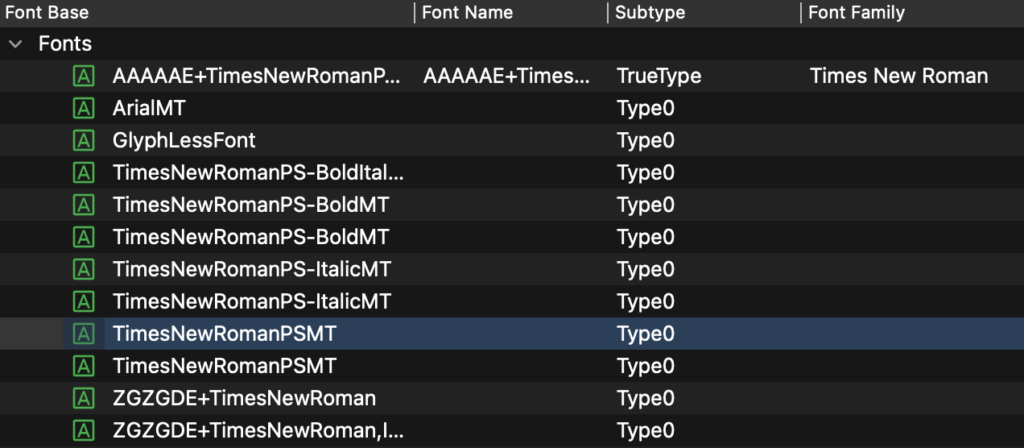
Fonts
No headings found in this post.
PDF Conversion
Fast PDF Conversions in PDFix Desktop
Basic Conversion Actions
PDF to HTML Conversion Methods in PDFix
Tagged PDF to Responsive HTML
Untagged PDF to HTML
Convert to Fixed HTML
Data Extraction
Export Selection to HTML
Copy with Formatting
Snapshot
Browser
No headings found in this post.
Destinations
How to Add Link Tags in PDFix Desktop
License
Online License Activation
Offline License Activation
License Update
License Deactivation
How to Define Annotations
How to Define PDF Annotations in PDFix Desktop
Check Annotation Types
Predefined Annotation Sets
Define Annotations by Regex
Define Annotations by Template
Example 1: All annotations except hidden and invisible
Example 2: Link annotations with empty Contents key
Example 3: All annotations with specific box
Missing help
No headings found in this post.
PDFix Actions Pipeline
Action Manager Dialog in PDFix Desktop
Basic Actions
Default Actions
Custom Actions
External Actions
External Actions
External Actions
How to Add External Action
How to Install Docker
How to Define Tags
How to Define PDF Tags in PDFix Desktop
Check Tag Types
Predefined Tag Sets
Define Tags by Regex
Define Tags by Template
Example 1: Empty tags without content
Example 2: Tags with empty spaces
Example 3: TD cells with specific font name and size
How to Define Content
How to Define PDF Content in PDFix Desktop
Check Page Objects
Predefined Set of Page Objects
Define Content by Template
Example 1: Untagged content
Example 2: Content that should be marked as Header
Example 2.1: Content that will be marked as Header on each page except the first one
Example 3: Content that should be marked as Footer
Example 3.1: Content that will be marked as Footer on each page except the last one
Tag Tool
Tag Tool
Tag View
Edit Tag
How to Edit Tag
Edit Table
Edit Table Headers
How to Edit Table Headers
Move Tag
Basic Actions
Basic Actions List
Index
Accessibility
Fix Role Mapping
params:
example:
AutoTag
params:
example:
Clear Document Structure
params:
example:
Fix ID Tree
example:
Fix Parent Tree
example:
Fix Spaces
params:
example:
Fix Headings
params:
example:
Annotations
Fix Media Clip
params:
example:
Set Tab Order
params:
example:
Tag Annotations
params:
example:
Set Annotation Contents
params:
example:
Remove Annotation Properties
params:
example:
Flatten Annotations
params:
example:
Create Web Links
params:
example:
Delete Annotations
params:
example:
Bookmarks
Create Bookmarks
params:
example:
Content
Set Content Language
params:
example:
Delete Content
params:
example:
Artifact Content
params:
example:
Flatten Form XObjects
params:
example:
Clone Form XObjects
params:
example:
Remove Content Marks
params:
example:
Set Content Color
params:
example:
Conversion
PDF to HTML
params:
example:
PDF to JSON
params:
example:
Fonts
Embed Fonts
example:
Replace Font
params:
example:
Add Missing Unicodes
example:
Metadata
Set Document Properties
params:
example:
Set PDF Version
params:
example:
Set PDF/UA Standard
params:
example:
Set Suspect Value
example:
Fix Optional Content
example:
Fix Display Document Title
example:
Set Document Language
params:
example:
Set Title
params:
example:
Pages
Rotate Page
params:
example:
Fix Page Orientation
params:
example:
Split Pages
params:
example:
Table
Fix Table Cells
params:
example:
Set Table Summary
params:
example:
Tags
Apply Standard Tags
params:
example:
Set Role Mapping
params:
example:
Import Tags
params:
example:
Delete Tags
params:
example:
Rename Tags
params:
example:
Clone Tag XObjects
example:
Set Tag Language
params:
example:
Set Tag ID
params:
example:
Set Tag BBox
params:
example:
Set Alternate Description
params:
example:
Set Actual Text
params:
example:
Fix Placement
params:
example:
Fix Document Tag
example:
Fix List Tag
params:
example:
Fix Link Tag
params:
example:
Remove Tag Properties
params:
example:
Set Tag Attributes
params:
example:
Fonts
Fonts panel
Leave us a Question or Comment
Posted
March 31, 2024
in
User Guide
Tags:
You might also like
ADA Accessibility Deadline 2026: How Governments Can Automate PDF Compliance with PDFix
December 6, 2025
Best AI Models for Auto-Tagging PDFs in 2025: Fast, Accurate, and PDF/UA-Ready
November 30, 2025
How to Generate PDF Alt Text Automatically: 4 Methods from Manual to AI-Powered (2025 Guide)
November 26, 2025